
Many readers sent questions regarding wireless taskbar icon and wireless wizard on Control Panel (for Bluetooth, infrared, and Wi-Fi) that often disappear without notice from their Windows XP screen. It's quite puzzling and annoying especially when the problem becomes persistent.
Here, I'd like to share my tips when dealing with this situation:
- I have to take a note about when the last time the lovely icon was there.
- I have to remember what I had done before the icon disappeared, whether downloading & installing automatic Windows update, updating a device driver, installing new hardware or application, working with my wireless dongle or else.
- I have to check whether my PC memory and processor can still cope with new tasks.
I traced and solved the problem using these tools:
- System Configuration Utility via Services and Startup tabs. On Services tab, I can tick Bluetooth Support Service, Infrared Monitor, and Wireless Zero Configuration among other services. On Startup tab, I can find programs that I want to run automatically in the background once my PC starts up. Selecting a program file from the Startup tab will let the associated program icon to appear on the System Tray or the taskbar, hence it's called taskbar icon. If too many programs are running, one or several taskbar icons sometimes disappear. I open System Configuration Utility by clicking "start" and then "Run", on the input box type this: "msconfig".
- Device Manager. This is my favorite tool because it senses any hardware or driver update in real time. Even though I can't fix the problem directly from the Device Manager, this tool very often gives a hint as to what has caused the change of a hardware-related application behavior.
- System Restore. At many occasions, System Restore tool which can be accessed from Windows XP Help and Support Center (start>Help and Support>Pick a task>"Undo changes to your computer with System Restore") helped return my PC to a previous stable state. And it doesn't delete files or emails in the restoration process. The nice thing is I can pick a certain date from a calendar as my Restore Point and if mistaken I can reverse the process.
- Windows Task Manager. From the Task Manager, I can see running applications, processes, CPU and memory usage, networking load, and logged on users. If too many applications and processes are running, then it's time to close some. I open the Task Manager usually by pressing "Ctrl+Alt+Del", but it can also be invoked by right-clicking on the System Tray and click Task Manager.
In the case of Windows XP's Wireless Zero Configuration (WZC) service, some folks (me included) sometimes lose it because of the "Use Windows to configure my wireless network settings" is accidentally unchecked in the Wireless Network Connection properties window. A third party software may help. For example, my wireless adapter utility can enable and disable WZC.
If those tips and tricks above don't cure, I would manually open my PC's casing (if my wireless adapter is a PCI card) and detach the adapter from the PCI slot or unplug my wireless adapter (if it is a USB dongle or PC Card). I would then turn on my computer and after everything settles, turn it off and re-insert the hardware. After that, turn on the computer again and re-install the driver and application.
Ever lost your Bluetooth icon or other wireless icons or services? Share your experience. How did you finally fix it?
Note:
infrared taskbar icon only appears if an infrared (IrDA)-enabled device is present near the computer's IrDA window (beamer) in LOS (line-of-sight).
Windows XP Networking Guide : Bluetooth wizards
Saturday, September 30, 2006
Losing the Bluetooth icon?, tips and tricks.

Thursday, June 08, 2006
World Cup Countdown
Be friend first before pairing

With only a few hours left from the first kick-off, it's party time in Germany. Since football (soccer) fans from around the world will be flocking the twelve wonderful stadia, this is certainly "a time to make friends". Whichever team you are supporting doesn't matter, in the end there must be only one team lifting the World Cup.
This time around, Bluetooth will play a part in this festival. It will be in the hands of millions football fans. In many gadgets particularly mobile phones, Buetooth transmission is limited in range of up to 10 meters. So it's safe to share cool pic's of magnificent goals, salto, free kicks, corners, penalties via Bluetooth. However the thousands people packing each stadium poses a possibility of things like virus and spam spreading from hand to hand. To prevent such things from infecting your Bluetooth device, these simple precautionary tips might help:
- Turn off Bluetooth when not in use (this is also useful to save battery)
- Assign a unique name to each Bluetooth device, to easily identify one another.
- When active, only make it discoverable when you agree with someone else to exchange some goodies.
- Pair with your friends' devices before entering the stadium, it will be safer and take shorter time.
- Don't accept a connection request from unknown devices. While it is nice to have new friends, this is not the right way to do it. It may be a virus spreading scheme. Know the person first, and then ask about his/her Bluetooth device name. After that, you can pair your device with his/her and start a connection.
Happy 2006 FIFA World Cup. Winning or losing is number two because this is "a time to make friends".
Tuesday, May 09, 2006
Anyone uses a 3-in-1 phone?
A review of forgotten Bluetooth profiles
A 3-in-1 (three-in-one) phone usage scenario appeared since the first version of Bluetooth specification.
Definition
It refers to a handset that can function as
1. mobile (cellular) phone when out and about within a cellular network coverage,
2. cordless phone when at home, near a fixed line (landline) telephone base station,
3. intercom (walkie-talkie) when two persons are establishing a direct speech connection in close distance.
To enable the latter two (points 2 and 3), the specification defined TCS (Telephony Control Signaling) Binary Profile which is the basis of Corldless Telephony Profile (CTP) and Intercom Profile (ICP).
Benefits
It shows a fixed-mobile convergence (though only in handset since other convergence issues relate to core network, management, numbering, billing and handover mechanism) and it allows users to bypass cellular operators when communicating within Bluetooth range. These may result in lower monthly communication bill.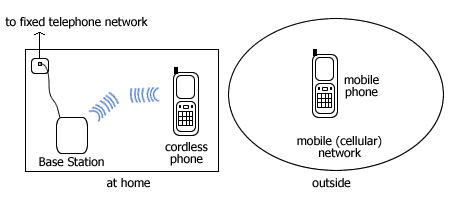
If your Bluetooth mobile phone supports CTP, you don't need another cordless phone at home to receive or make a landline call.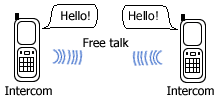
And if in addition it also supports ICP, when - for instance - attending a class or in an exhibition zone, you want to contact another attendee you don't need to dial his/her cellphone number. Just search for his/her phone's Bluetooth device name on your screen and contact him/her via Bluetooth. Since this voice call bypasses your cellular operator, you needn't pay a penny for it.
The call is routed over Bluetooth SCO (Synchronous Connection Oriented) link, a dedicated voice link which is occupied for the duration of the call, comparable to the circuit-switched landline phone circuit.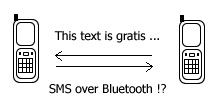
If Bluetooth standard also formalize bluejacking by creating for instance SMS over Bluetooth profile, I think a lot of users will love Bluetooth, especially texting-intensive youngsters.
Product availability
The 3-in-1 phone concept would be very attractive to users had it been followed by the mass production of such phone which hasn't been a reality until now. Browsing the Bluetooth SIG website for products that support a 3-in-1 phone usage model ends up only to the Bluetooth specification document.
Why mobile phone vendors did not race to produce such a phone?
It seems they didn't want to upset cellular operators since in developed markets handsets are channeled through cellular operators. At the time when traditional voice operators (telcos) are facing VoIP challenge, this is a sensitive issue.
I did googling on 3-in-1 Bluetooth phone and found only one such phone, i.e. Sony Ericsson W550i even though there are several Bluetooth chip and PSTN/ISDN access point vendors who stated CTP and ICP support in their products. For example, Broadcom (who acquired Widcomm) makes Bluetooth chip and stack for embedded devices that support CTP and ICP.
If things stay the same in the near future, wouldn't the Bluetooth 3-in-1 phone usage model be buried under the shadow of the increasingly popular VoIP-capable handset? (i.e. VoWLAN or voice over Wi-Fi)
Comparing a 3-in-1 Bluetooth phone with the BT (British Telecom) Fusion's 2-in-1 Bluephone
A Bluephone works as a mobile phone when outside user's home and within BT (MVNO to Vodafone) cellular network. When user walks into his/her house, within a home Bluetooth access point coverage, if he/she is in the middle of a call, the call is switched automatically to BT Broadband landline network via the home access point. The handoff is seamless, without user intervention. This solution is applicable only to BT Broadband subscribers.
Using Bluetooth standard CTP, the switch from/to mobile and cordless is to be decided by the user if he/she is aware of the presence of cheaper landline network. This scenario can work with any mix of fixed and mobile operators.
On the walkie-talkie mode, the direct speech connection (ICP) between two persons within Bluetooth range is completely free peer-to-peer (ad hoc) link without a service provider involvement or a typical office DECT cordless base station and PBX.
Introduction to Bluetooth Profiles