Thursday, December 10, 2009

Sony VAIO Smart Network : turning on/off Bluetooth radio

To turn on Bluetooth on VAIO Z series (mine a VGN-Z47GD), both the hardware and software wireless switch must be turned on.

The hardware wireless switch, which also works for Wi-Fi, is located on the front side under the keyboard pad. When the switch is on, the LED on its left sports a green light.

opening VAIO Control Center from Windows Vista Start button

VAIO Smart Network link in VAIO Control CenterKnowing this laptop's computer name (Blutooth device-name) and MAC address (Bluetooth Device address) from VAIO Smart Network Switch


Meanwhile, the (software) VAIO wireless switch, which is named VAIO Smart Network, can be accessed from Windows Vista Start button, by scrolling through All Programs list or by typing VAIO on the search box and choose VAIO Control Center. On VAIO Control Center, VAIO Smart Network link is located under Network Connections.

VAIO Smart Network icon on the system trayto show VAIO Smart Network floating window from taskbar icon right-click menu.


The wireless switch also can be opened from taskbar (system tray) by right clicking VAIO Smart Network icon and select Show main window or Show floating window. I like the latter option, it's simple and neat.

turning on Bluetooth through VAIO Smart Network floating switch

VAIO Smart Network floating switch coordinates very well with Windows Vista networking functions. The turning on/off of Wi-Fi/Bluetooth or the plugging/unplugging of Ethernet/telephone jack through VAIO Smart Network floating menu is quickly responded by changes in Network Connections folder and Network and Sharing Center.

Monday, August 31, 2009

Bluetooth in iPhone 3G and iPhone 3GS

iPhone 3G/3GS comes with built-in Bluetooth radio, that's version 2.0+EDR in iPhone 3G and version 2.1+EDR in iPhone 3GS. Although the radio specification is slightly different, Bluetooth in iPhone 3G and iPhone 3GS work in the same way since both use the same iPhone OS.

Bluetooth Photo Share app helps transfer photos from iPhone to iPhone, one at a timeBluetooth in iPhone works somehow in a "protected" mode. One can not freely exchange image/photo files or other objects with other Bluetooth phones or Bluetooth-enabled computers, commonly a fun thing to do with other phones because this iPhone (Apple) implementation of Bluetooth does not support OBEX (object exchange) or OPP (object push profile) and FTP (file transfer profile). Even for sending/receiving photos to/from other iPhone, one needs the help of an external app, such as Bluetooth Photo Share. (Personally, I used this app for transferring some images from an iPhone 3G to an iPhone 3GS and it's quite helpful for bypassing iTunes procedure which would take longer time.) Many consider this as major drawbacks compared with other average Bluetooth cell phones, but I think it was designed to be just like that.


iPhone is pairing with a Bluetooth headset, entering PIN code using iPhone on-screen keypad.    iPhone is pairing with Sony Ericsson Akono Bluetooth headset.


However, it works very well with a third party (mono/stereo) Bluetooth headset even though -in my experience- iPhone needs longer time to discover a Bluetooth headset in its vicinity compared with other Bluetooth smartphones.


playing voice memo on iPhone with Bluetooth headset    making call on iPhone with Bluetooth headset    talking over Bluetooth when receiving a call on iPhone.


Bluetooth headset can be used while placing/receiving phone calls, playing audio/video files (mp3, flv, and other supported formats), recording/playing voice memo, and working with third party audio apps.


iPhone status bar shows Internet Tethering blue strip when activeIt has been said everywhere that iPhone 3G/3GS running iPhone OS 3.0 or later can be used as a Bluetooth modem. Well, actually iPhone works as a PAN NAP (Personal Area Network Network Access Point), therefore it is capable of connecting more than one Bluetooth-enabled computers to Internet simultaneously and enabling file/printer sharing between them. This is an advantage over other smartphones if users know how to use it. Have you ever heard or used this wireless networking access point/router application of iPhone 3G/3GS before?

Friday, July 31, 2009

Sony VAIO: can't receive file via Bluetooth?

Top view of Sony VAIO Z series  Sony VAIO Z, unfolded


This week, I got a chance to play around with my nephew's brand new laptop Sony VAIO VGN-Z47GD. It is featured with 6 GB memory, 320 GB hard disk, NVIDIA GeForce 9300M GS graphic adapter, Blue-ray Disc, Wi-Fi a/b/g/n, Bluetooth Ver 2.1+EDR, Gigabit Ethernet, among other amenities. It's thin, lightweight, cute, and fancy.

I've tested briefly all its networking hardware: connecting its voice/fax modem to a phone line to get a dial-up Internet connection, plugging a 3.5G modem USB dongle to access Internet using WCDMA/HSDPA network, linking its Wi-Fi to my home wireless router, transferring large files to another computer using its Gigabit Ethernet adapter.

The Microsoft Bluetooth stack is pre-installed along with Broadcom's Widcomm stack to run the Alps Bluetooth radio on a Windows Vista Business 64-bit. Both Microsoft and Widcomm Bluetooth software work side-by-side. For basic profiles (object push, serial port, HID, HCRP, DUN, PAN), I use the Windows' built-in Microsoft software. For other profiles such as headset, audio gateway, FTP, and A2DP, I use the Widcomm software which is integrated seamlessly into Windows Vista's Control Panel and Windows Explorer. A connected Bluetooth device has its own control center which looks like Network and Sharing Center.

Windows Vista Bluetooth File Transfer Wizard: Receive a fileI was confused at my first try to send/receive photos to/from a mobile phone and a Blackberry. I was looking at the Bluetooth taskbar icon and right clicking it to find Send a File and Receive a File to no avail. Finally, I sent an image file from the Pictures folder by right clicking the file name and select Send To Bluetooth device. To receive a file, I opened Bluetooth File Transfer Wizard. It is located under Accessories. Well, I needed about half an hour to find this solution. Why Sony hides Send/Receive a File from the taskbar menu remains a question. As indicated in some Internet discussions, it turns out that many VAIO users were stuck with the same problem, that's being unable to send/receive files from/to VAIO at their first Bluetooth try.

Friday, July 24, 2009

Unable to perform Bluetooth operation!

I had been using my old Nokia 6600 phone only for a few SMS and occasional voice calls for two years. I still keep it because of a bunch of family photos, sound recordings, and short video clips stored in the phone memory that couldn't be uploaded to my computer because the phone's Bluetooth (and its infrared) had failed to operate for more than two years. Every time I switched on the Bluetooth, it said "Unable to perform Bluetooth operation!". I had never found a way to recover its Bluetooth capability even after searching for a fix for this error across the Internet.

One day this week, I just threw away the mobile phone into my bed forcefully without any purpose except for being in haste to catch up with my works. Aha.. to my surprise, after that incident the Bluetooth radio on my old Nokia 6600 performs perfectly. Everything is just fine. When once I met another "Unable to perform Bluetooth operation!" message on that GSM phone, I intentionally gave a few bumps to the phone's back with my hand, then it worked again. Gee, what are the rationales behind this seemingly stupid solution? Did the battery, the Bluetooth radio chip, or other component somehow become loosened so it needed to be hit?

A lot of comments on Internet message boards had suggested firmware update, restoring to factory settings, replacing Bluetooth chips, visiting a Nokia Care, and other serious actions as a possible solution for this symptom that had been causing so much headache. Yet, today I found one comment in a Nokia user forum that said knocking the phone by hand as the only fix. I can't agree more with him. Probably, the commentator shares the same experience with me.

Wednesday, April 01, 2009

Bluetooth Experience Icons


Bluetooth Experience Icons were introduced by the Bluetooth SIG to make it easy for anyone shopping for Bluetooth devices to find interoperable products. For example, if he wants a Bluetooth printer that can print photos captured by his digital camera, then he should look around for printer and camera bearing the Headset Icon on their packaging.

The presence of the relevant icons on all Bluetooth products will shorten the process of matching supported Bluetooth profiles between two or more Bluetooth devices. For average users, this is very useful for saving time and money when buying a Bluetooth product. A lot of users express discontent over buying incompatible devices.

On top of that, these icons will educate and thereby encourage users to utilize their Bluetooth devices beyond popular usage scenario. For example, many Bluetooth smart phones support other profiles besides headset profile. But being unaware of other supported profiles' capability, most consumers only pair it with a Bluetooth headset.

However, the effectiveness of Bluetooth Experience Icons in boosting global Bluetooth usage for its varied applications remains to be seen. It depends on the awareness of major hardware manufactures and software developers to follow the Bluetooth SIG recommendation to put relevant Bluetooth Experience Icons in their product packages. And the Experience Icons introduction is only one factor, other issues still have to be addressed by the Bluetooth SIG, the to-do-list must contain how to simplify the pairing process and develop non-techy user friendly Bluetooth software. Anyway, have you noticed any of the said icons on a Bluetooth product that you bought recently?

Tuesday, February 26, 2008

Microsoft Bluetooth stack in Windows Vista


After searching the web using few different phrases, I found this Word document that explains Microsoft Bluetooth stack. Below are excerpts from this article.

Windows Vista (and XP SP2) supports Bluetooth version 1.1, 2.0, and 2.0 with enhanced data rate (EDR). Windows Vista improves EDR performance relative to XP and coexistence between Bluetooth and Wi-Fi in the 2.4 GHz band using AFH (adaptive frequency hopping).

In-box Bluetooth profiles: HID, PANU, SPP, OPP, DUN. Other profiles requiring third-party software: fax, headset, A2DP, AV remote, hands-free, PAN GN, PAN NAP, phone book, SIM access.

By default, Bluetooth system tray icon only appears for 10 minutes after a Bluetooth device (e.g. dongle) is connected to a computer. To make it permanent on the system tray (never disappears again), tick the "Show the Bluetooth icon in the notification area" option in Control Panel (Classic View) > Bluetooth Devices window.

Bluetooth in Windows Vista


After installing Windows Vista Ultimate on one of my PC two weeks ago, I finally have time to play around with Bluetooth. To my amazement, no additional feature (profile, Bluetooth-speak). The menu, the tab, and the icon are too identical. The only difference is the Vista skin which is in aero style. I'm not quite sure if Microsoft Bluetooth stack on Vista is of version 2.0+EDR because when I tried it once for a PAN connection, the status window said the rate was 1.0 Mbps.

All in all, I still need another (third-party) Bluetooth stack for Windows Vista to use my Bluetooth headset and other fancy applications.

Saturday, October 20, 2007

What is your favorite Bluetooth application?

Hello,

I've always been interested to know this blog readers' most favorite Bluetooth application, the one that you use again and again every day. Be it wireless headset or handsfree, dial-up networking, PAN, or else. Please cast your vote on the accompanying poll. Also drop your comment here.

Thank you for your participation.

Wednesday, June 20, 2007

Wibree finally merges with Bluetooth

After much buzz, hype, and many objections following a Wibree launch late last year, what happened to the Wibree camp? At the end, Nokia as its developer realized the very similarity of Wibree with the short range Bluetooth. Now, Wibree spec is going to be integrated into an "ultra low power" Bluetooth Specification.

With Wibree in its fold, Bluetooth is geared toward expanding its presense to new areas, mainly sport and healthcare. Expect this integration in the likes of body sensors, wrist watch, and perhaps jewelries. In addition, traditional computer peripherals (mouse, keyboard, etc.) will also gain the benefit of operating with very low power consumption.

Tuesday, April 10, 2007

The coolest features of Bluetooth version 2.1+EDR


Play the video demo of Bluetooth v2.1+EDR by the Head of the Bluetooth SIG and a GEAR LIVE reporter. The 'Touch to Connect" feature is very cool. Also the pairing is simpler and more intuitive, which gave 100% improvement in connection time than the v2.0+EDR in the demo. It also introduced what is called NFC or Near Field Communication.

Sunday, April 01, 2007

Fax over Bluetooth


I personally prefer email over facsimile to send and receive document. But in government, business and financial sectors, facsimile is still frequently used. Various solutions exist to address the need of people who don't have access to a fax machine and/or service to send/receive faxes. Many companies offer numerous fax services on the Internet. Most operate by converting email to fax for fax-sending and fax to email for fax-receiving. On my part, I would like to share my experience when using a practical solution, that's using my Bluetooth phone as a fax modem.

These are the requirements:

- a Bluetooth enabled phone
- a fax service subscription, already activated by your cellular operator
- a laptop or desktop PC running Windows XP SP2 (Home or Professional)
- a fax software (there is one that comes with Windows, that's the Fax Console)

Here are the step-by-step guide:

- Install your Bluetooth phone on your computer, find the detailed instructions on this link. If your installation succeeds, you'll see Standard Modem over Bluetooth link on the Device Manager and Phone and Modem Option.
- Open Printers and Faxes on Windows Explorer (Control Panel>Printer and Faxes)
- Right-click Fax icon, select Properties to open the Fax Properties window
- On Fax Properties, go to the "Devices" tab. Select Standard Modem over Bluetooth link, click Properties.
- On the modem Properties window, on the "Send" tab, you can specify your fax-sending settings, i.e. TSID and fax-sending number of retries.
- On the "Receive" tab, you can specify your fax-receiving settings, i.e. CSID, manual or automatic answer, fax-printing, and fax-backup.
- The settings you've defined in the fax modem Properties window, will appear on the "Devices" tab of Fax Properties window.
- Click Apply and OK.

Now you are ready to send and/or receive faxes using your Bluetooth phone as a fax modem.

You can send a fax using Windows' Fax Console (start > All Programs > Accessories > Communications> Fax > Fax Console) or via other Windows applications (File > Print).
I'll compile the screenshots. When they are ready, I'll put the link here. In the meantime, happy bluefaxing...

FYI: If you are planning to upgrade to Windows Vista, you can only find built-in fax software (i.e. Windows Fax and Scan) on Vista Business and Ultimate. You can't find it on Home Basic and Home Premium.

Bluetooth FAX Profile

Saturday, March 31, 2007

Don't have a LAN? Why not create a PAN?

If you have two PCs (desktop or laptop or whatever kinds of PAN-enabled computers), you can connect both with Bluetooth. I have tested, tried, and used it. It's a fun even at a maximum of 3 Mbps data rate.

Here below are the requirements:

- Your computers are running Windows XP SP2 (Home or Professional) or Vista,
- Both are Bluetooth-enabled using an external Bluetooth dongle or via an integrated-Bluetooth radio.

Even though the Microsoft stack solution only supports PAN user (PANU) service and doesn't support GN or NAP, I found this very handy in certain situations, such as on travel or inside a meeting. With this PANU-to-PANU direct connection, you can share any resources (files, folders, printers, etc.) except an Internet connection. I've also tried Net Meeting on this kind of PAN and it ran well.

To create such a Bluetooth ad hoc link, do these steps via Bluetooth Devices icon on Control Panel or the Bluetooth taskbar icon:

- Turn on the Bluetooth radio
- Make your computer discoverable (Bluetooth Devices>Options>Turn discovery on)
- Pair your computers (Bluetooth Devices>Devices>Add)
- Create a direct connection (Bluetooth taskbar icon>Join a Personal Area Network>select the paired computer on the list and click connect)
- Ready to share ...
- Open My Network Places and browse thoroughly under the Microsoft Windows Network, if you have set files/folders/printers to be shared across the ad hoc network, you can find them here.

Remember, each computer must have been assigned a unique name and both must have the same workgroup name. You can do this from Control Panel>System>System Properties>Computer Name>Change.

Here is the link as a comparison when using a PANU-to-GN connection with the help of a third party Bluetooth stack. Notice the difference, the latter is able to provide an Internet gateway and more than two computers (including PAN-enabled PDAs or smartphones) can join the wireless PAN.

==> The screenshots have been uploaded now (May 9, 07). You can read it here.

Bluetooth Version 2.1+EDR is coming

How many people who have Bluetooth-enabled PCs or gadgets have ever used their Bluetooth? According to a survey (sorry, I read somewhere and couldn't recall the source), only 30% of Bluetooth devices owners have ever used the radio. And those who manage to use it, most only taste a few applications such as small file transfer. Many other Bluetooth capabilities as described in the Bluetooth profiles are simply too complicated for novice users.

Driven by the above fact, the Bluetooth SIG has created an update to the existing Bluetooth Specification (i.e. Bluetooth version 2.0+EDR) with the focus on improved usability, security, and power consumption. The new specification will ensure a shorter pairing process involving less pairing steps, facilitate link encryption without user intervention, and reduce power consumption by up to five times. Such updates will hopefully be appealing to a broader user base to use Bluetooth in everyday activities and extending Bluetooth application to areas beyond its traditional markets.

The new Spec doesn't increase Bluetooth maximum data rate though, it remains at 3 Mbps. But in the future, the next Spec will enable Bluetooth to run over a very wide UWB channel to multiply data rates up to hundreds Mbps.

BLUETOOTH SIG IMPROVES USER EXPERIENCE

Sunday, December 24, 2006

Can the Nokia factor bring Wibree to the mass?

Nokia launched low rate, low power, small size, low cost cable replacement radio technology.

In October 06, Nokia announced the existence of yet another wireless technology named Wibree developed by Nokia's researchers.

Wibree's properties can be summarized as follows:
- It works on the ISM band, already shared by Wi-Fi, Bluetooth, ZigBee and other proprietary technologies.
- It has a 30-foot (10-meter) range, similar with Class 3 Bluetooth.
- It can achieve speeds of up to 1 Mbps.

By looking at its properties, Wibree is somewhat the earlier Bluetooth version but Nokia argued that Wibree is different because Wibree achieves its performance with one tenth the power consumption of Bluetooth and smaller footprint. Wibree addresses a niche that hasn't been addressed by other wireless technologies.

Technology-wise, nothing new and special about Wibree, since several proprietary short-range radio technologies also work with very low power such as the potential Kleer but Nokia aims to push Wibree to becoming an open standard by taking advantage of Nokia's leading position in mobile phone business. Nokia encourages other companies to license Wibree, creating a Wibree ecosystem emulating the success of Wi-Fi and Bluetooth, and developing standalone Wibree chip and dual-mode Wibree-Bluetooth chip.

In a standalone scenario, Wibree is going to be embedded in devices which require very long battery life therefore need to be recharged infrequently, such as watches, health monitors, sport sensors, keyboards, mice, and toys. However as a number one mobile phone maker, Nokia doesn't hide its ambition to integrate Wibree into its mobile phones by creating a dual-mode scenario that's Wibree on Bluetooth chip. The dual-mode Wibree-Bluetooth chip is targeted for mobile/portable devices such as mobile phone, PDA, notebook.

The typical applications Nokia uses as examples automatically direct my mind to ZigBee (low rate WPAN IEEE 802.15.4). ZigBee is promoted by several industry leaders in sensor, monitoring and automation business. Its specification had already been completed and certification has been started. Whilst Bluetooth has throughput advantage over Wibree, ZigBee has range advantage over Wibree. Moreover, ZigBee has networking capability. Wibree is caught in the middle.

But the fact that ZigBee is still far from replacing the X10 protocol and the likes for one of its target markets, i.e. home automation might have led Nokia to develop yet another radio technology and put Wibree on a distance from ZigBee. In my opinion, ZigBee players lack the drive to push ZigBee to the mainstream and ZigBee doesn't have a news-machine. No one did like what Intel had done for WiMedia-UWB (WUSB) and WiMAX.

Below is a comparison table examining the feasibility of Wibree for today's common applications and the foreseeable future with a mobile phone as the base device. Please note though that a Wibree Specification hasn't been released so this is only a general assessment.


ApplicationWibreeBluetoothZigBee
Business card or other PIM data exchangeYes. The size is small, only text file.Yes. Its primordial use.No. Not designed for this.
Transferring small item like image, song (ringtone), short clip one at a timeYesYes. Already in use.No
Wireless headset or handsfree kitNo. Audio is not in its profiles, although theoretically it can be done.Yes. Has upgraded it to support stereo audio.No
Synch'ing mobile phone with PCNo. Too slow especially for synch'ing many items.Yes. One of its popular applications.No
Using mobile phone as a dial-up modemNo. Not within its targeted application.Yes. Has been used by travelers.No
Image, photo, or video/audio clip folder transfer/sharingNo. Will be very slow.Yes. Still needs speed increase as multimedia files become largerNo
Human Interface Device (HID): keyboard and mouseYes. One of its main targets. Need to switch current Bluetooth based products to Wibree.Yes. Already in use and available from many vendors.Yes. But implementation is almost unheard.
Wireless printingYes. One of its main targets. But over time its speed would keep users away from it.Yes. Already in use. The next generation Bluetooth (WUSB-alike) has greater potential.No
Remote controlling TV, lamp, window, door, AC, etcYes. One of its main targets although its reach has to be optimized. Interesting if a cell phone becomes a universal remote control.No. It theoretically can do it but implementation on this field is rare, many proprietary protocols have accomplished the job.Yes. ZigBee was designed from the beginning for home automation. It has longer reach than Wibree (30 meters or more).
Communicating with wearable things (watch, sport sensor, jewelry)Yes. One of its main targets.No. Consumes too much power and has larger size.Yes. Has advantage in its ultra low power consumption.


Latest update: Wibree finally merged with Bluetooth.

Friday, December 15, 2006

Wouldn't you mind if your PC doesn't have a USB connector?
There comes Wireless USB !

Perhaps, nothing more confusing in the realm of burgeoning wireless standards than Wireless USB (or WUSB for short). The name itself could create misperception. Below are my notes on the Certified Wireless USB (its complete name).

1. Wireless USB does NOT mean USB port plus a wireless dongle such as that for Wi-Fi, IrDA, or Bluetooth. But a type of a Wireless USB implementation and this is the most likely case in the first phase is just wireless business as usual, that's you'll connect a Wireless USB dongle (referred to as HWA or Host Wire Adapter in the spec) to a USB connector on your PC to enable Wireless USB on it, like what you have done with Bluetooth, IrDA and Wi-Fi right now. Meanwhile, legacy USB products such as your printer, scanner, keyboard and mouse can be connected wirelessly to the WUSB-enabled computer via a DWA (Device Wire Adapter).
2. Because every one of us has an intense relation with USB port and cord every day, in our mind USB is always identical with that rectangular connector. It's hard to imagine a USB without cable. When the Wireless USB comes into existence, maybe we should start calling the current USB a "Wired" USB to remove confusion. Wireless USB has similar properties with USB 2.0 minus the cable.

3. To initiate a connection, two wireless USB devices have to associate each other to ensure both are the parties that want to talk to each other. The process which is called pairing in Bluetooth. There are two association models, i.e. numeric association model using number input/display and cable association model by connecting two devices via a short cable before going wireless. Not entirely getting rid of cable.
4. The physical layer as has been discussed in the previous post uses UWB radio (a very wide spectrum in the 3.1 - 10.6 GHz band) based on the WiMedia Multiband OFDM platform. This results in very high throughput (by current standard), that's 480 Mbps at up to 3 meters and 110 Mbps at up to 10 meters.

5. Because of its range limitation, it is categorized as a Wireless Personal Area Network (WPAN) technology, the same category as Bluetooth but added with this citation "high-rate" WPAN. When Bluetooth starts using UWB radio as its PHY and becomes high-rate as well, I wonder how it will be named and positioned on the new wireless map.

6. Similar with Bluetooth, the topology is point-to-point in a hub-and-spoke configuration. In a Wireless USB cluster, there must be a host and up to 127 devices, compared to a master and up to 7 active slaves in a Bluetooth piconet. In an OTG (On-The-Go) capable Wireless USB gadget, it can sometimes act as a host or a device depending on each connection purpose.

7. The targeted usage scenario is home entertainment connectivity, which encompasses TV, PC-related hardware, CE (Consumer Electronics), and mobile/portable communication/multimedia devices. Most are the same devices that have already carried Wi-Fi or Bluetooth.
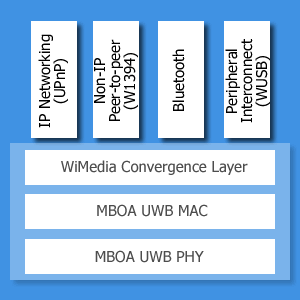
Why did they (Intel n co) create another wireless, while we're overwhelmed with the existing techno? There is a formal logic behind the standard creation that's the success of USB as a number one interface on PC and other PC-related hardware. We must admit though that some portion of that success comes from that wireless dongle that plugs nicely into a USB rectangular connector.

Whether Wireless USB will be as successful as its counterpart "Wired" USB? Its promoters said yes, because it is easy to use and plug-and-play. But surely, Wireless USB will find competition from older wireless standards.

Sunday, December 10, 2006

New Year's Wishes (1) : Beautify the stack and the spec

To Microsoft:

Please extend Bluetooth capability in Windows XP (SP2) even though you are now busy selling Vista. Do not leave XP users in the dark. Add more services to it with reference to the latest Bluetooth specification.
Did you know that many users find it difficult to work with various third party drivers and software? Yeah, Bluetooth protocol is more complicated than Wi-Fi, but it should be included in the generic Windows functions since it has become an established standard.

To the Bluetooth SIG:

Bluetooth has spread like wild fire and it's present in nearly every new gadget, but the popular use of it is still limited to certain basic services due to - at least in the perception of many users - the impractical process of device authentication and authorization and the confusing and lengthy profile-matching.
That's why please shorten and simplify (or automate) the connection process to make it easy for common users to enjoy all Bluetooth services. Make passing an introperability test a requirement for a compliant Bluetooth product.

Agree or not? I've got to channel many readers' frustrations anyway. Hope you guys stop by and respond. Thank you.

Saturday, September 30, 2006

Losing the Bluetooth icon?, tips and tricks.


Many readers sent questions regarding wireless taskbar icon and wireless wizard on Control Panel (for Bluetooth, infrared, and Wi-Fi) that often disappear without notice from their Windows XP screen. It's quite puzzling and annoying especially when the problem becomes persistent.

Here, I'd like to share my tips when dealing with this situation:

- I have to take a note about when the last time the lovely icon was there.
- I have to remember what I had done before the icon disappeared, whether downloading & installing automatic Windows update, updating a device driver, installing new hardware or application, working with my wireless dongle or else.
- I have to check whether my PC memory and processor can still cope with new tasks.

I traced and solved the problem using these tools:

- System Configuration Utility via Services and Startup tabs. On Services tab, I can tick Bluetooth Support Service, Infrared Monitor, and Wireless Zero Configuration among other services. On Startup tab, I can find programs that I want to run automatically in the background once my PC starts up. Selecting a program file from the Startup tab will let the associated program icon to appear on the System Tray or the taskbar, hence it's called taskbar icon. If too many programs are running, one or several taskbar icons sometimes disappear. I open System Configuration Utility by clicking "start" and then "Run", on the input box type this: "msconfig".

- Device Manager. This is my favorite tool because it senses any hardware or driver update in real time. Even though I can't fix the problem directly from the Device Manager, this tool very often gives a hint as to what has caused the change of a hardware-related application behavior.

- System Restore. At many occasions, System Restore tool which can be accessed from Windows XP Help and Support Center (start>Help and Support>Pick a task>"Undo changes to your computer with System Restore") helped return my PC to a previous stable state. And it doesn't delete files or emails in the restoration process. The nice thing is I can pick a certain date from a calendar as my Restore Point and if mistaken I can reverse the process.

- Windows Task Manager. From the Task Manager, I can see running applications, processes, CPU and memory usage, networking load, and logged on users. If too many applications and processes are running, then it's time to close some. I open the Task Manager usually by pressing "Ctrl+Alt+Del", but it can also be invoked by right-clicking on the System Tray and click Task Manager.

In the case of Windows XP's Wireless Zero Configuration (WZC) service, some folks (me included) sometimes lose it because of the "Use Windows to configure my wireless network settings" is accidentally unchecked in the Wireless Network Connection properties window. A third party software may help. For example, my wireless adapter utility can enable and disable WZC.

If those tips and tricks above don't cure, I would manually open my PC's casing (if my wireless adapter is a PCI card) and detach the adapter from the PCI slot or unplug my wireless adapter (if it is a USB dongle or PC Card). I would then turn on my computer and after everything settles, turn it off and re-insert the hardware. After that, turn on the computer again and re-install the driver and application.

Ever lost your Bluetooth icon or other wireless icons or services? Share your experience. How did you finally fix it?

Note:
infrared taskbar icon only appears if an infrared (IrDA)-enabled device is present near the computer's IrDA window (beamer) in LOS (line-of-sight).

Windows XP Networking Guide : Bluetooth wizards

Thursday, June 08, 2006

World Cup Countdown
Be friend first before pairing


With only a few hours left from the first kick-off, it's party time in Germany. Since football (soccer) fans from around the world will be flocking the twelve wonderful stadia, this is certainly "a time to make friends". Whichever team you are supporting doesn't matter, in the end there must be only one team lifting the World Cup.

This time around, Bluetooth will play a part in this festival. It will be in the hands of millions football fans. In many gadgets particularly mobile phones, Buetooth transmission is limited in range of up to 10 meters. So it's safe to share cool pic's of magnificent goals, salto, free kicks, corners, penalties via Bluetooth. However the thousands people packing each stadium poses a possibility of things like virus and spam spreading from hand to hand. To prevent such things from infecting your Bluetooth device, these simple precautionary tips might help:

- Turn off Bluetooth when not in use (this is also useful to save battery)
- Assign a unique name to each Bluetooth device, to easily identify one another.
- When active, only make it discoverable when you agree with someone else to exchange some goodies.
- Pair with your friends' devices before entering the stadium, it will be safer and take shorter time.
- Don't accept a connection request from unknown devices. While it is nice to have new friends, this is not the right way to do it. It may be a virus spreading scheme. Know the person first, and then ask about his/her Bluetooth device name. After that, you can pair your device with his/her and start a connection.

Happy 2006 FIFA World Cup. Winning or losing is number two because this is "a time to make friends".

Tuesday, May 09, 2006

Anyone uses a 3-in-1 phone?
A review of forgotten Bluetooth profiles

A 3-in-1 (three-in-one) phone usage scenario appeared since the first version of Bluetooth specification.

Definition

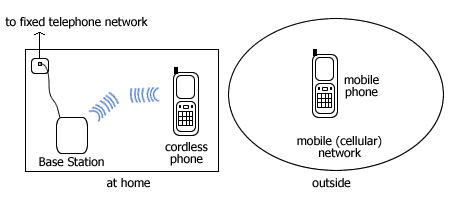
It refers to a handset that can function as

1. mobile (cellular) phone when out and about within a cellular network coverage,
2. cordless phone when at home, near a fixed line (landline) telephone base station,
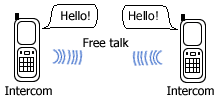
3. intercom (walkie-talkie) when two persons are establishing a direct speech connection in close distance.

To enable the latter two (points 2 and 3), the specification defined TCS (Telephony Control Signaling) Binary Profile which is the basis of Corldless Telephony Profile (CTP) and Intercom Profile (ICP).

Benefits

It shows a fixed-mobile convergence (though only in handset since other convergence issues relate to core network, management, numbering, billing and handover mechanism) and it allows users to bypass cellular operators when communicating within Bluetooth range. These may result in lower monthly communication bill.


If your Bluetooth mobile phone supports CTP, you don't need another cordless phone at home to receive or make a landline call.


And if in addition it also supports ICP, when - for instance - attending a class or in an exhibition zone, you want to contact another attendee you don't need to dial his/her cellphone number. Just search for his/her phone's Bluetooth device name on your screen and contact him/her via Bluetooth. Since this voice call bypasses your cellular operator, you needn't pay a penny for it.

The call is routed over Bluetooth SCO (Synchronous Connection Oriented) link, a dedicated voice link which is occupied for the duration of the call, comparable to the circuit-switched landline phone circuit.


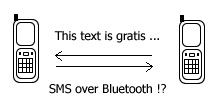
If Bluetooth standard also formalize bluejacking by creating for instance SMS over Bluetooth profile, I think a lot of users will love Bluetooth, especially texting-intensive youngsters.

Product availability

The 3-in-1 phone concept would be very attractive to users had it been followed by the mass production of such phone which hasn't been a reality until now. Browsing the Bluetooth SIG website for products that support a 3-in-1 phone usage model ends up only to the Bluetooth specification document.

Why mobile phone vendors did not race to produce such a phone?
It seems they didn't want to upset cellular operators since in developed markets handsets are channeled through cellular operators. At the time when traditional voice operators (telcos) are facing VoIP challenge, this is a sensitive issue.

I did googling on 3-in-1 Bluetooth phone and found only one such phone, i.e. Sony Ericsson W550i even though there are several Bluetooth chip and PSTN/ISDN access point vendors who stated CTP and ICP support in their products. For example, Broadcom (who acquired Widcomm) makes Bluetooth chip and stack for embedded devices that support CTP and ICP.

If things stay the same in the near future, wouldn't the Bluetooth 3-in-1 phone usage model be buried under the shadow of the increasingly popular VoIP-capable handset? (i.e. VoWLAN or voice over Wi-Fi)

Comparing a 3-in-1 Bluetooth phone with the BT (British Telecom) Fusion's 2-in-1 Bluephone

A Bluephone works as a mobile phone when outside user's home and within BT (MVNO to Vodafone) cellular network. When user walks into his/her house, within a home Bluetooth access point coverage, if he/she is in the middle of a call, the call is switched automatically to BT Broadband landline network via the home access point. The handoff is seamless, without user intervention. This solution is applicable only to BT Broadband subscribers.

Using Bluetooth standard CTP, the switch from/to mobile and cordless is to be decided by the user if he/she is aware of the presence of cheaper landline network. This scenario can work with any mix of fixed and mobile operators.

On the walkie-talkie mode, the direct speech connection (ICP) between two persons within Bluetooth range is completely free peer-to-peer (ad hoc) link without a service provider involvement or a typical office DECT cordless base station and PBX.

Introduction to Bluetooth Profiles

Friday, April 28, 2006

Why Media is NOT an IEEE standard?


It's hard to find time to catch up with all techno news in this era of information overload. I have an RSS aggregator with more than a dozen feeds but very often after updating the feeds, my concentration was distracted by other activities on my workstation.

I made a mistake in the previous post because I missed some news. The WiMedia UWB platform hasn't been an IEEE standard yet and is not going to become one because the IEEE 802.15.3a project was disbanded by vote. Why? according to a news source after 3 years of UWB standardization effort, even though the task group (TG3a) has consolidated 23 UWB PHY candidates into 2 proposals, i.e. MB-OFDM and DS-UWB, it failed to reach a consensus on one candidate UWB physical layer (PHY) specification.

Fyi, MB-OFDM is backed by the WiMedia Alliance while DS-UWB is supported by the UWB Forum. The companies involved in developing an IEEE standard always push core parts of their technologies to be incorporated into an upcoming standard in an effort to have time advantage. So it's difficult to unite them.

What's the impact? As with other emerging technologies, having a standard means products from different manufacturers or vendors will be interoperable, therefore consumers won't be locked to one vendor. In the end, it will lead to wider market acceptance and cheaper products for end users. In the absence of a standard, what to expect? Perhaps, the stronger contender becomes the winner and takes all.

This might be a clue. Wireless USB has become a specification in May 2005. WUSB 1.0 resembles USB 2.0 except it is wireless and it runs over WiMedia UWB radio platform. New PCs carrying WUSB radio interface will be out to market in 2006 holiday season according to another news source. Like wired USB, WUSB can do file transfer, DUN, synch, video streaming, peripheral interconnection. It supports 480 Mbps transfer rate at up to 3 meters, 110 Mbps at 10 meters. It also allows devices with dual-role capability (both as host and peripheral) to interconnect, that's USB OTG (On-The-Go). Existing PCs and devices can be WUSB-enabled using an adapter (Wire Adapter).

Whether Bluetooth will embrace both UWB PHYs or choose only the WiMedia's? It's still unclear to me. I have to check it out. But since there are overlaps, what killer apps should the next Bluetooth offer as WUSB is already on the horizon, at the entrance gate?